

The Ultimate Guide to Salik in Dubai (2026): Everything You Need to Know
February 06, 2026
Dubai
LicensePlate.ae Team
The Ultimate Guide to Salik in Dubai (2026): Everything You Need to Know

Your Complete Resource for Dubai's Electronic Toll System
Last Updated: February 2025
Table of Contents
1. What is Salik?
2. How Salik Works: Simple Explanation
3. How Salik Works: Technical Deep Dive
4. Complete List of Salik Gates in Dubai
5. Salik Charges and Pricing (2025 Update)
6. How to Get a Salik Tag
7. Salik Registration Process
8. How to Check Your Salik Balance
9. How to Recharge Your Salik Account
10. Salik Fines and Violations
11. Frequently Asked Questions
12. Tips for New Dubai Drivers
What is Salik?
Salik (Arabic, meaning "open" or "clear") is Dubai's state-of-the-art electronic toll
collection system, launched by the Roads and Transport Authority (RTA) on July 1,
2007. Unlike traditional toll booths, where drivers must stop to pay, Salik operates
seamlessly without barriers, allowing vehicles to pass through at full highway speed.
Why Salik Exists ?
Dubai implemented Salik to:
- Reduce traffic congestion on major highways and bridges
- Improve traffic flow across the emirate
- Generate revenue for road maintenance and infrastructure development
- Encourage the use of public transportation during peak hours
- Support Dubai's smart city initiatives through technology integration
- The Name and Vision
The name "Salik" perfectly captures the system's purpose: keeping Dubai's roads
"clear" and traffic "moving." It represents Dubai's commitment to innovation, efficiency,
and world-class infrastructure that enhances the quality of life for residents and visitors
alike.
How Salik Works: Simple Explanation
If you're new to Dubai or simply want a quick understanding, here's how Salik works in
plain language:
The Basics
1. Get a Salik Tag: You purchase a small orange sticker (RFID tag) that costs AED 100
2. Stick it to Your Windshield: The tag goes on the inside of your windshield, near the rearview mirror
3. Add Credit to Your Account: You load money into your Salik account (minimum
AED 50)
4. Drive Through Toll Gates: When you pass under a Salik gate, the system
automatically detects your tag
5. Automatic Deduction: The toll fee is instantly deducted from your account
balance
6. No Stopping Required: You continue driving at normal highway speed
What You See
Salik gates are distinctive overhead structures that span the entire width of the highway.
They feature:
- Grey gantry structures with yellow and black stripes
- Green "Salik" signage visible from a distance
- Cameras and sensors that read your tag
- No physical barriers or toll booths
The Experience
You'll barely notice the toll gates. As you drive under one, you might hear a subtle beep
from your tag (if your stereo is quiet), and that's it. A few AED are deducted from your
account, and you continue on your way. It's completely seamless and takes zero time.
How Salik Works: Technical Deep Dive
For those who want to understand the technology and system architecture behind Salik,
here's a comprehensive technical explanation.
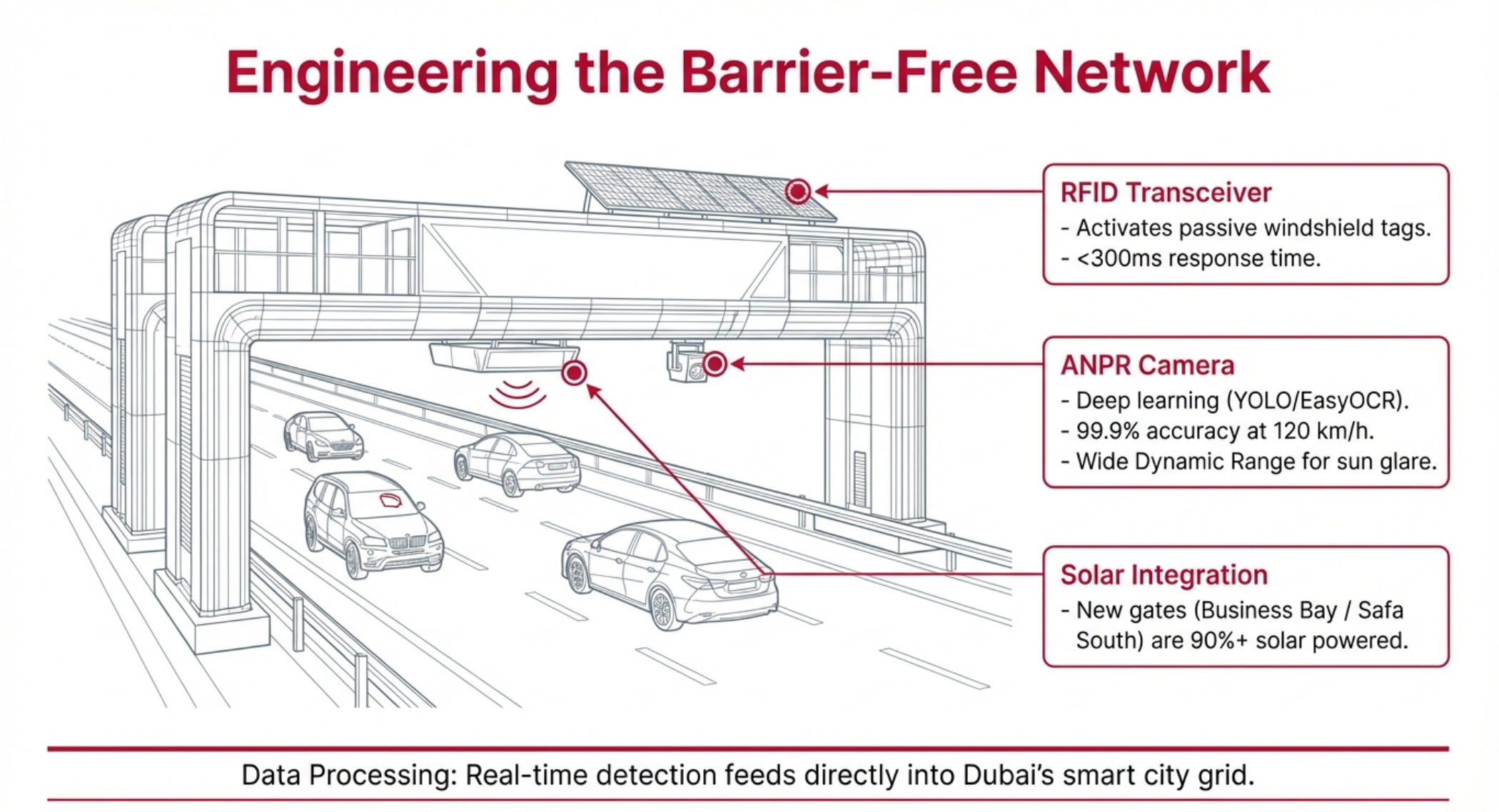
- RFID Technology
Salik uses Radio Frequency Identification (RFID) technology, specifically passive
RFID tags:
Passive RFID Tags: Unlike active tags that contain batteries, Salik tags are powered by
the electromagnetic field generated by readers at the toll gates.
This means:
- No battery replacement needed
- Unlimited lifespan
- Low cost
- Maintenance-free operation
How Detection Works:
1. As your vehicle approaches a Salik gate, you enter the detection zone (typically
50-100 meters before the gate)
2. The gate's RFID reader emits radio waves at specific frequencies.
3. When these waves hit your Salik tag, they power its microchip.
4. The energized tag transmits its unique identifier back to the reader
This entire process happens in milliseconds, even at highway speeds (120+km/h)
System Architecture
The Salik system comprises several integrated components:
1. Tag Layer
- Each tag contains a unique ID number
- The tag is linked to a specific vehicle's license plate
- One tag can only be associated with one vehicle at a time
2. Detection Layer
- Overhead gantries equipped with RFID readers
- High-resolution cameras for license plate capture
- Sensors to verify vehicle passage
- Real-time data transmission infrastructure
3. Processing Layer
- Central database that stores all account information
- Transaction processing engine
- Real-time balance verification system
- Fraud detection algorithms
4. Account Management Layer
- Web portal and mobile applications
- Payment gateway integration
- SMS notification system
- Customer service interface
The Transaction Flow
Here's what happens in the split second you pass through a Salik gate:
1. Detection (T+0ms): RFID reader detects tag and captures unique ID
2. Verification (T+50ms): System queries the database to confirm the tag is active
and linked to a vehicle
3. Camera Capture (T+100ms): High-speed cameras photograph the license plate
for verification
4. Balance Check (T+150ms): System verifies sufficient account balance
5. Deduction (T+200ms): Appropriate toll amount is deducted from the account
6. Logging (T+250ms): Transaction is recorded with timestamp, gate location, and
balance
7. Notification (T+300ms): Account update triggers SMS/app notification if
configured
All of this happens in under one-third of a second.
Edge Cases and Exceptions
Multiple Tags Detected: If the system detects multiple tags in the same vehicle (rare),
it will typically charge the first tag detected. However, this can cause issues, so it's
important to remove old tags when getting a replacement.
Failed Detection: If the tag fails to be read (due to improper placement, damage, or
system error), the cameras capture the license plate, and the system attempts to match
it to a registered tag. If no match is found, a violation is flagged.
Paired Gates: Al Mamzar North/South and Al Safa North/South operate as paired
gates. If you pass through both within one hour, traveling in the same direction, you're
only charged once.
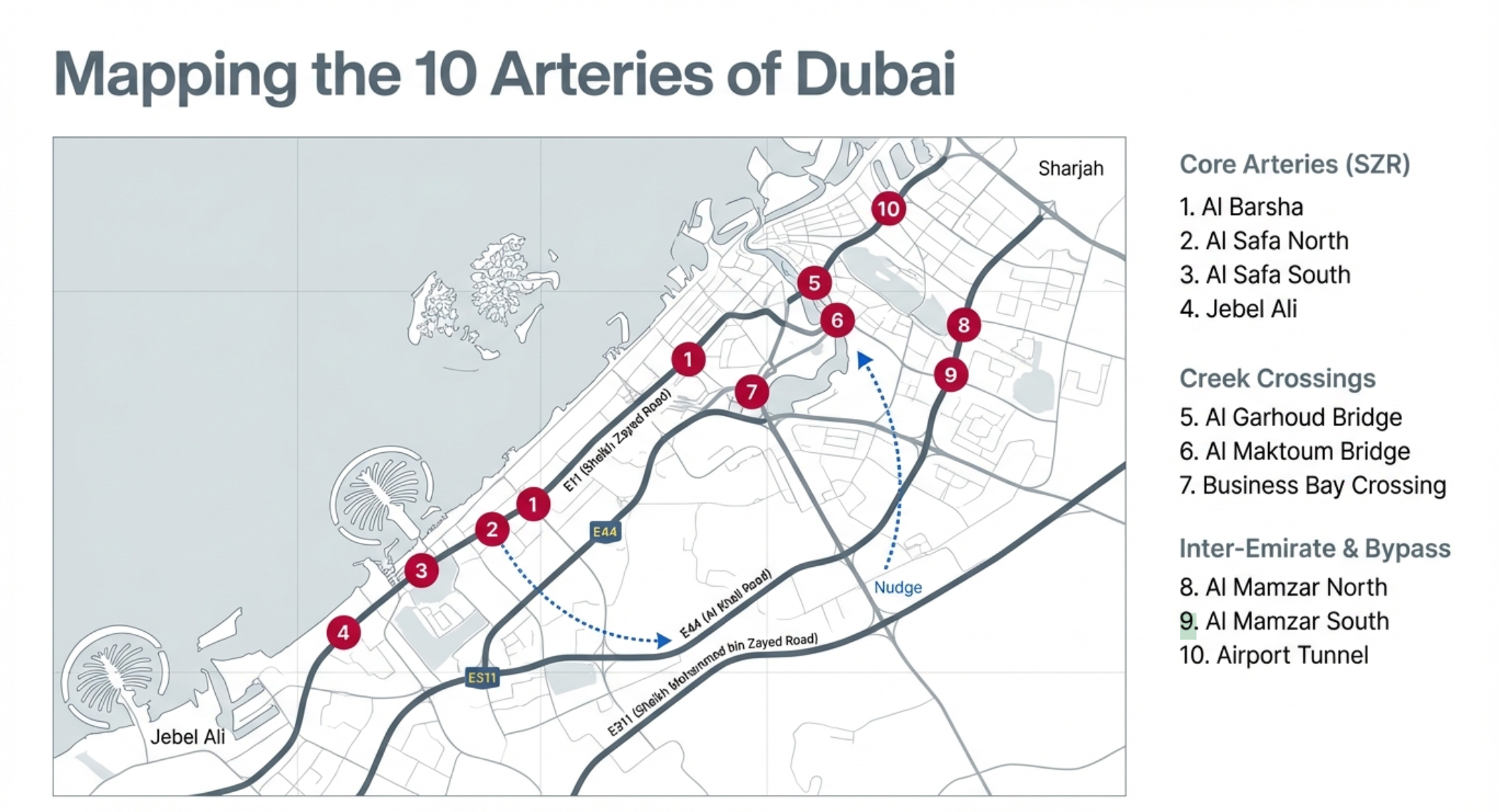
Complete List of Salik Gates in Dubai (2025)
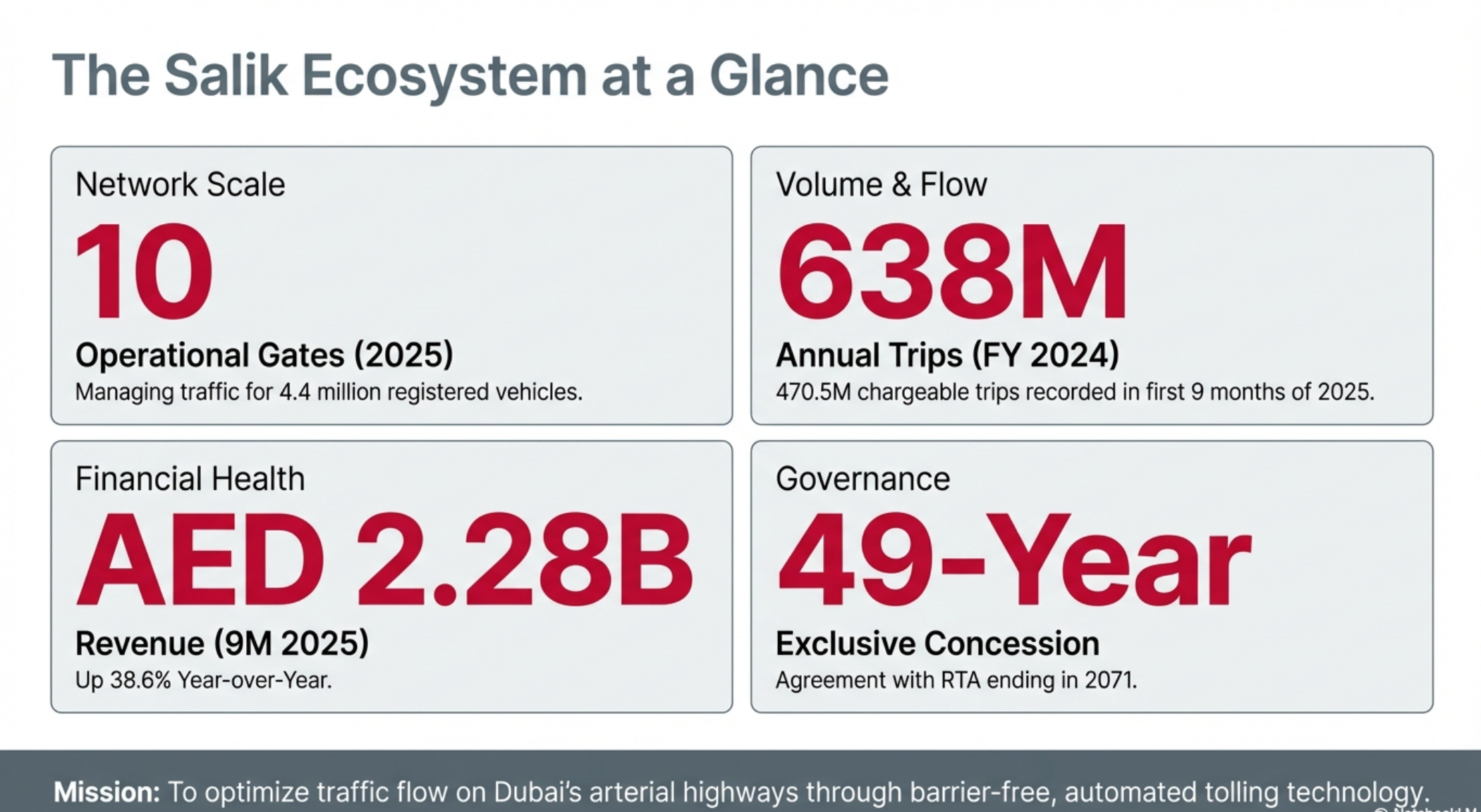
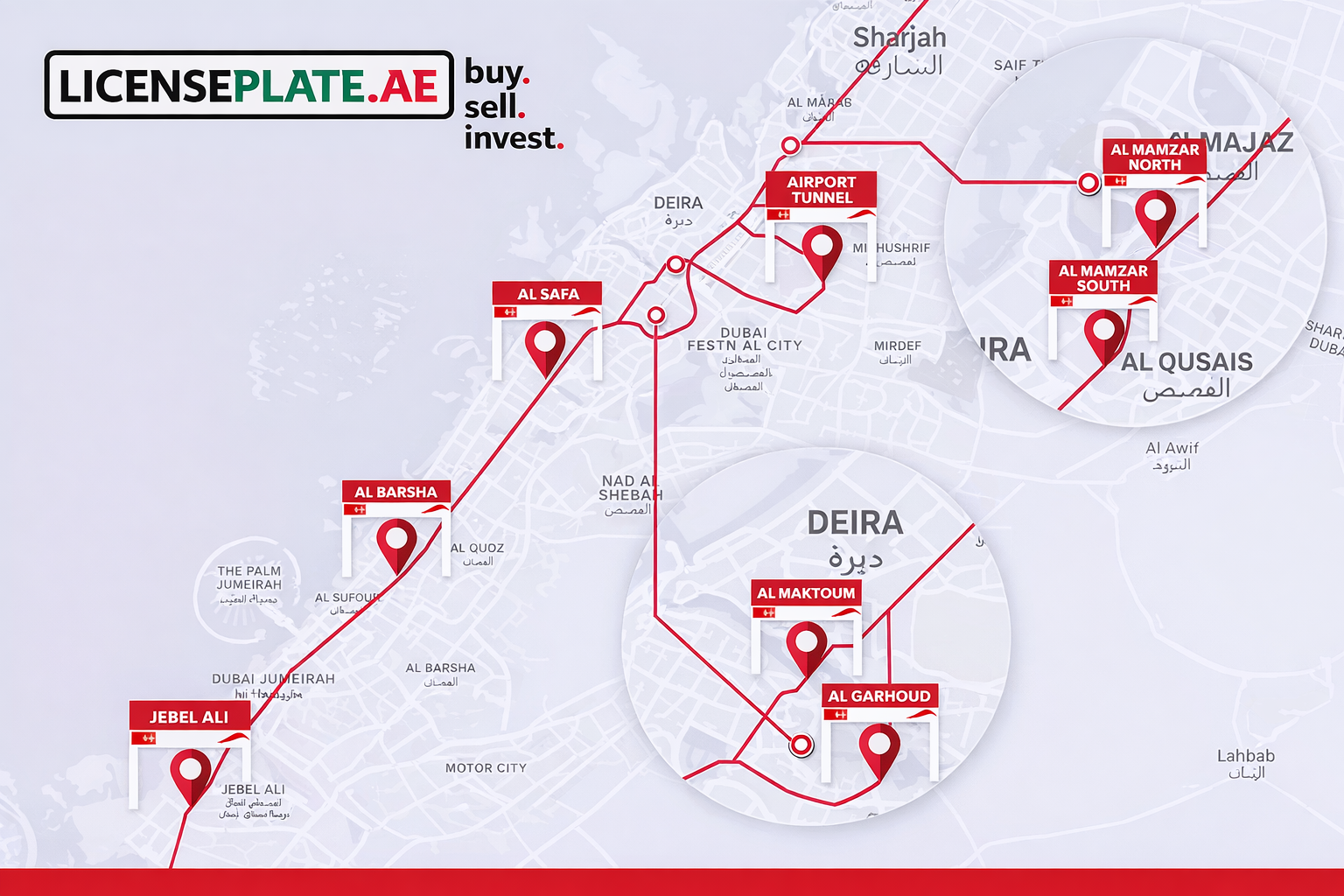
As of February 2025, Dubai operates 10 active Salik toll gates strategically positioned
across the emirate's major highways and bridges. Here's the complete, detailed
breakdown:
1. Al Maktoum Bridge Gate
Location: Umm Hurair Road, crossing Dubai Creek
Coordinates: Approximately 25.2367° N, 55.3269° E
Direction: Both directions (Deira ↔ Bur Dubai)
Roads Served: Connects Deira and Bur Dubai across the Creek
Key Details:
- One of the original gates (operational since 2008)
- Located on the historic Al Maktoum Bridge
- Critical crossing for accessing the Bur Dubai business district
- Special Timing: Free passage Monday-Friday from 10:00 PM to 6:00 AM, and
all day Saturday from 10:00 PM to Monday 6:00 AM
Alternative Routes: Floating Bridge (free), Business Bay Bridge
Nearby Landmarks: Al Fahidi Historical District, Dubai Creek Park
2. Al Garhoud Bridge Gate
Location: Sheikh Rashid Road, crossing Dubai Creek
Coordinates: Approximately 25.2453° N, 55.3328° E
Direction: Both directions (Deira ↔ Bur Dubai)
Roads Served: Sheikh Rashid Road (connects to Sheikh Zayed Road and Al Khail
Road)
Key Details:
- Operational since 2007 (one of the first two gates)
- Major route for Dubai International Airport access
- Heavily used during morning and evening rush hours
- Serves both local and through traffic
Alternative Routes: Al Maktoum Bridge, Floating Bridge, Business Bay area routes
Nearby Landmarks: Dubai Creek Golf & Yacht Club, Dubai Festival City
3. Al Barsha Gate
Location: Sheikh Zayed Road (E11), near Mall of the Emirates
Coordinates: Approximately 25.1172° N, 55.2008° E
Direction: Both directions (Dubai ↔ Abu Dhabi)
Roads Served: Sheikh Zayed Road (E11)
Key Details:
- Located before the Mall of the Emirates when traveling from Dubai toward Abu Dhabi
- Separated from Al Safa gates in 2017 (previously operated as paired gates)
- High-traffic area due to proximity to major shopping and residential districts
- Serves Dubai Marina, Jumeirah Lakes Towers, and Al Barsha areas
Alternative Routes: Al Khail Road (E44), Umm Suqeim Road, Al Wasl Road
Nearby Landmarks: Mall of the Emirates, Ski Dubai, Al Barsha residential area
4. Al Safa North Gate
Location: Sheikh Zayed Road (E11), near Al Safa Park
Coordinates: Approximately 25.1895° N, 55.2397° E
Direction: Both directions (Dubai ↔ Abu Dhabi)
Roads Served: Sheikh Zayed Road (E11)
Key Details:
- Positioned in the heart of Dubai's modern business corridor
- Operates in tandem with Al Safa South gate
- One-Hour Rule: If you pass both Al Safa North and South within one hour in the
same direction, you're only charged once
- Strategic location for accessing Downtown Dubai and DIFC
Alternative Routes: Al Wasl Road, Beach Road, Al Khail Road
Nearby Landmarks: Burj Khalifa, Dubai Mall, World Trade Centre
5. Al Safa South Gate
Location: Sheikh Zayed Road (E11), between Al Meydan Street and Umm Al Sheif
Street
Coordinates: Approximately 25.1634° N, 55.2283° E
Direction: Both directions (Dubai ↔ Abu Dhabi)
Roads Served: Sheikh Zayed Road (E11)
Key Details:
- Added in November 2024 as one of the newest gates
- Works in conjunction with Al Safa North (one-hour pairing rule applies)
- Located in a high-density commercial and residential corridor
- Improves traffic management on the central SZR section
Alternative Routes: Al Wasl Road, Al Khail Road, parallel service roads
Nearby Landmarks: Dubai International Financial Centre, Emirates Towers
6. Jebel Ali Gate
Location: Sheikh Zayed Road (E11), near Ibn Battuta Mall
Coordinates: Approximately 25.0443° N, 55.1195° E
Direction: Both directions (Dubai ↔ Abu Dhabi)
Roads Served: Sheikh Zayed Road (E11), serves Jebel Ali area
Key Details:
- Westernmost gate on Sheikh Zayed Road
- Critical for accessing Jebel Ali Free Zone, one of the world's largest
- Serves Dubai Marina, JBR, and Jebel Ali residential communities
- Installed in 2017 near Energy Metro Station
Alternative Routes: Sheikh Mohammed Bin Zayed Road (E311), Al Khail Road
Nearby Landmarks: Ibn Battuta Mall, Jebel Ali Free Zone, Dubai Marina
7. Al Mamzar North Gate
Location: Al Ittihad Road (E11), north of Al Mamzar Beach Park
Coordinates: Approximately 25.2889° N, 55.3496° E
Direction: Northbound (Dubai → Sharjah)
Roads Served: Al Ittihad Road toward Sharjah border
Key Details:
- Operational since April 2013
- Primary toll point for traffic leaving Dubai toward Sharjah
- Works as paired gate with Al Mamzar South
- One-Hour Rule: Pass both Mamzar gates within one hour in the same direction
and pay only once
- Extremely high traffic volume during peak hours
Alternative Routes: Emirates Road (E611), Sheikh Mohammed Bin Zayed Road
(E311)
Nearby Landmarks: Al Mamzar Beach Park, Hamriya Port, Dubai-Sharjah border
8. Al Mamzar South Gate
Location: Al Ittihad Road (E11), south of Al Mamzar
Coordinates: Approximately 25.2776° N, 55.3427° E
Direction: Southbound (Sharjah → Dubai)
Roads Served: Al Ittihad Road from Sharjah into Dubai
Key Details:
- Operational since April 2013
- Primary entry toll point from Sharjah to Dubai
- Paired with Al Mamzar North gate (one-hour rule applies)
- Critical for Sharjah residents working in Dubai (estimated 400,000+ daily
commuters)
Alternative Routes: Emirates Road (E611), Sheikh Mohammed Bin Zayed Road
(E311)
Nearby Landmarks: Sharjah border, Al Mamzar area, Port Saeed
9. Airport Tunnel Gate
Location: Beirut Street, Airport Tunnel
Coordinates: Approximately 25.2511° N, 55.3585° E
Direction: Both directions
Roads Served: Airport Tunnel under Dubai International Airport runways
Key Details:
- Operational since April 2013
- Strategic location for airport-bound traffic
- Tunnel connects Deira with areas south of the airport
- Alternative to surface routes that may be congested
Alternative Routes: Al Garhoud Bridge area routes, surface streets through Deira
Nearby Landmarks: Dubai International Airport, Al Garhoud district
10. Business Bay Crossing Gate
Location: Al Khail Road (E44), Business Bay Crossing
Coordinates: Approximately 25.1844° N, 55.2614° E
Direction: Both directions
Roads Served: Al Khail Road through Business Bay
Key Details:
- Newest gate, operational since November 2024
- Located on the increasingly important Al Khail Road corridor
- Serves the rapidly developing Business Bay district
- Part of RTA's strategy to distribute traffic across multiple routes
Alternative Routes: Sheikh Zayed Road, Al Wasl Road
Nearby Landmarks: Business Bay towers, Dubai Canal, Downtown Dubai
Quick Reference Map Guide
Sheikh Zayed Road (West to East):
1. Jebel Ali Gate
2. Al Barsha Gate
3. Al Safa South Gate
4. Al Safa North Gate
Creek Crossings:
1. Al Garhoud Bridge Gate
2. Al Maktoum Bridge Gate
Sharjah Border (North-South):
1. 2. Al Mamzar North Gate (exit Dubai)
Al Mamzar South Gate (enter Dubai)
Other Strategic Locations:
1. Airport Tunnel Gate
2. Business Bay Crossing Gate
Salik Charges and Pricing (2026 Update)
Salik introduced variable pricing in January 2025, marking a significant shift from the
previous flat-rate system. Understanding the new pricing structure is essential for
managing your travel costs effectively.
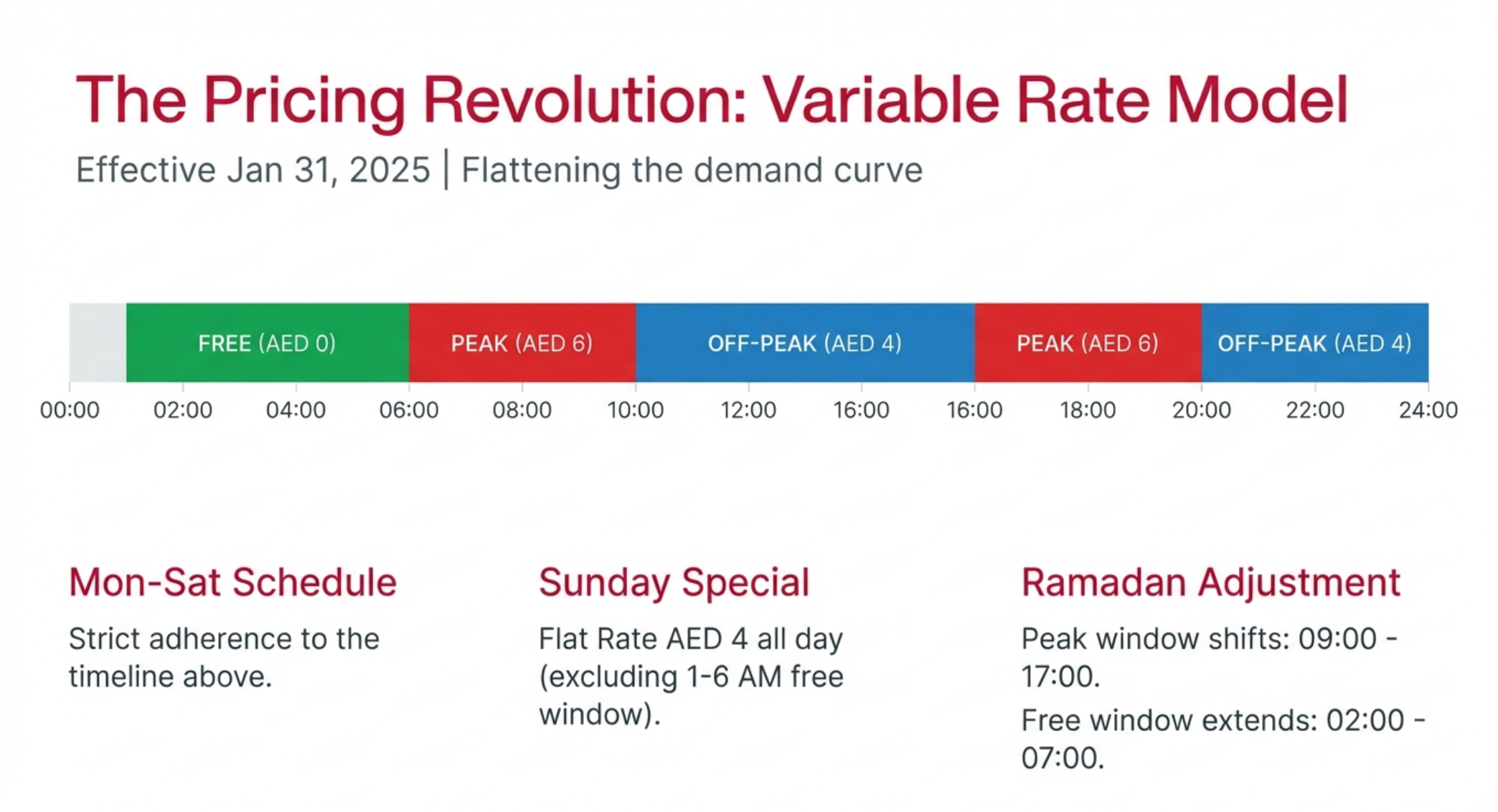
Current Pricing Structure (Effective January 31, 2025)
Peak Hours: AED 6 per crossing
Monday through Saturday:
- 6:00 AM - 10:00 AM (morning rush hour)
- 4:00 PM - 8:00 PM (evening rush hour)
Off-Peak Hours: AED 4 per crossing
Monday through Saturday:
- 10:00 AM - 4:00 PM (midday)
- 8:00 PM - 1:00 AM (late evening)
Free Travel Window: AED 0
Daily (all week):
- 1:00 AM - 6:00 AM (late night/early morning)
Exception: Al Maktoum Bridge has extended free periods
Sunday Special Rate: AED 4 (All Day)
- Flat AED 4 rate throughout Sunday
- Excludes public holidays (when regular schedule applies)
Al Maktoum Bridge Special Timing
Free Passage:
- Monday-Friday: 10:00 PM - 6:00 AM
- Saturday: 10:00 PM through Monday 6:00 AM (entire weekend)
This exception makes the Al Maktoum Bridge particularly attractive for night-time travel
between Deira and Bur Dubai.
Ramadan Timings (Special Adjustment)
During the holy month of Ramadan, Salik adjusts its pricing schedule to accommodate
fasting and prayer times:
- Free Suhoor Travel: 2:00 AM - 7:00 AM
- Peak Hours (AED 6): 9:00 AM - 5:00 PM
- Evening Discount (AED 4): 5:00 PM - 2:00 AM
Important Pricing Rules
No Daily Maximum: Unlike the previous system (which capped charges at AED 24/day
until 2013), there is currently no daily limit. If you pass through 10 gates in one day, you
pay for all 10 crossings.
Direction Matters: Tolls are charged per passing, regardless of direction. Crossing the
same gate in both directions counts as two separate charges.
No Toll-Free Days: All gates operate 24/7, 365 days a year. There are no completely
toll-free days, though there are toll-free hours.
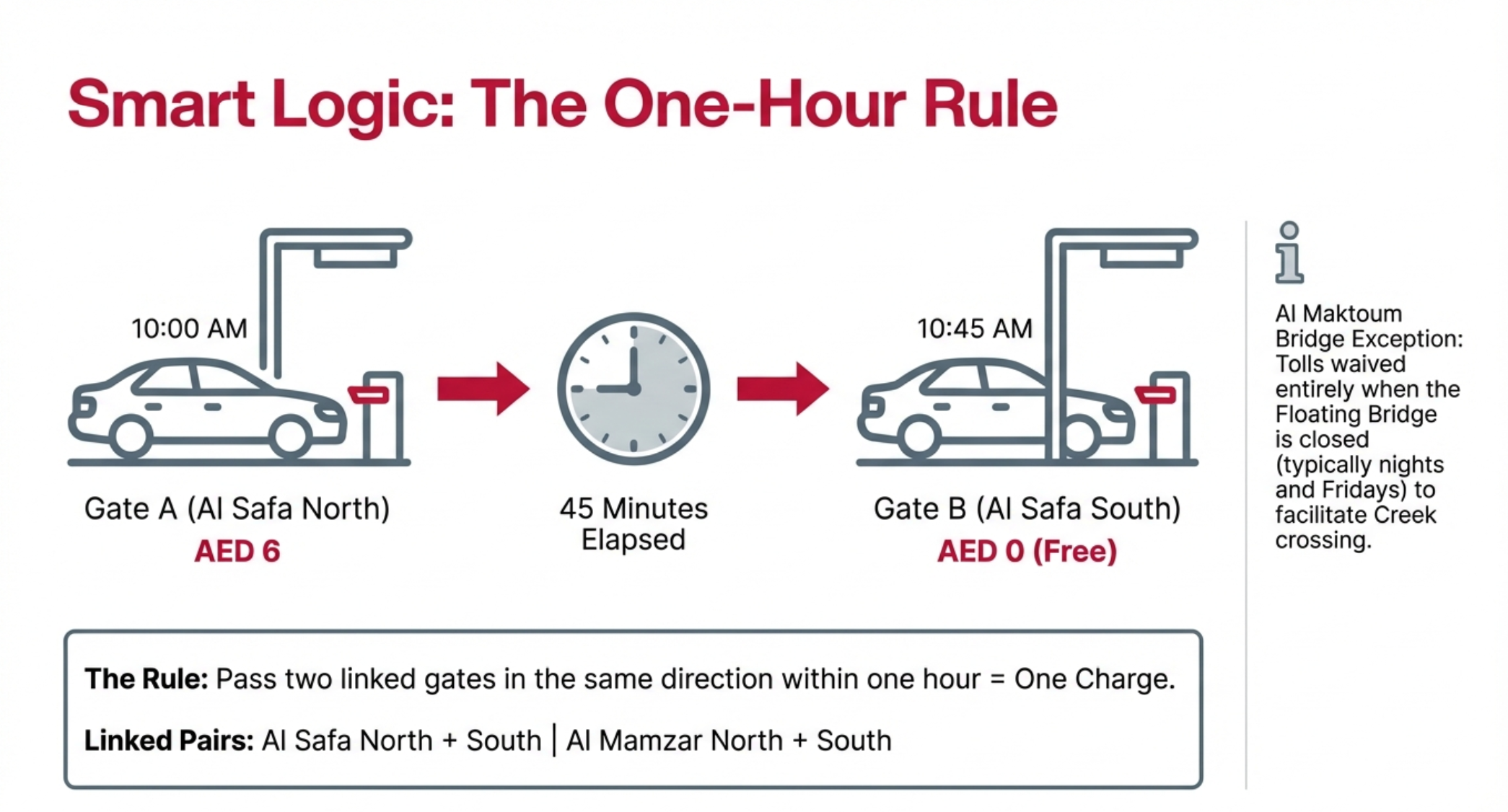
Paired Gates Exception (One-Hour Rule)
If you pass through the following paired gates within one hour in the same direction,
you are only charged once:
Paired Gates:
1. 2. Al Mamzar North + Al Mamzar South
Al Safa North + Al Safa South
Example: If you pass Al Safa North at 2:00 PM and Al Safa South at 2:30 PM while
traveling toward Abu Dhabi, you pay AED 4 once, not AED 8.
Important: This only applies when traveling continuously in the same direction within 60
minutes. If you make a U-turn or pass in opposite directions, both tolls apply.
Cost Examples (Typical Journeys)
Dubai Marina to Dubai International Airport (peak hours):
- Via SZR: Al Barsha (AED 6) + Al Safa North/South (AED 6) + Al Garhoud (AED6) = AED 18
- Via Al Khail Road: Business Bay (AED 6) + Al Garhoud (AED 6) = AED 12
Savings: AED 6 by avoiding SZR gates
Sharjah to Downtown Dubai (peak hours):
- Al Mamzar South (AED 6) + Al Safa North (AED 6) = AED 12
Weekly Commuter (Sharjah to Dubai):
- 5 days/week, 2 trips/day (to and from work)
- Peak hours both ways: 10 crossings × AED 6 = AED 60/week
- Off-peak both ways: 10 crossings × AED 4 = AED 40/week
- Annual savings (off-peak): AED 20/week × 52 weeks = AED 1,040
Historical Pricing Reference
For context, here's how Salik pricing has evolved:
- 2007-2013: AED 4 per crossing, AED 24 daily maximum
- 2013-2025: AED 4 per crossing, no daily maximum
- 2025-Present: Variable pricing (AED 4-6 depending on time)
EV Incentive Program
Electric Vehicle Exemption:
- 100% electric vehicles qualify for free Salik tags
- Tag valid for 5 years from issuance
- Both private and commercial EVs eligible
- Must register EV with RTA and provide proof of electric status
Toll charges still apply based on time-of-day pricing
This incentive aligns with Dubai's sustainability goals and encourages adoption of
zero-emission vehicles.
How to Get a Salik Tag
Acquiring a Salik tag is a straightforward process with multiple purchase options. Here's
your complete guide:
Where to Purchase Salik Tags
1. Petrol Stations (Most Common)
Available at all major fuel station chains:
- ENOC (Emirates National Oil Company)
- EPPCO (Emirates Petroleum Products Company)
- ADNOC (Abu Dhabi National Oil Company)
- Emarat
Cost: AED 100 total
AED 50 for the physical tag
AED 50 pre-loaded credit
Process: Simply ask the cashier for a Salik tag. You'll receive the tag with an activation
key on the back.
2. Online Purchase (Salik Website)
Website: www.salik.ae
Cost: AED 120 total
AED 50 for the tag
AED 50 credit
AED 20 delivery fee
Process:
1. Visit salik.ae and click "Buy Tag"
- Fill in your details (Emirates ID, vehicle registration, mobile number)
- Provide delivery address
- Make payment via credit/debit card
- Tag is delivered within 5 working days
- Tag comes pre-activated (no manual activation needed)
Advantages: Convenient for those who prefer not to visit physical locations; tag arrives
activated.
Disadvantages: Delivery time required; slightly more expensive.
3. RTA Customer Happiness Centres
Locations:
- Umm Ramool (near Dubai International Airport)
- Deira
- Al Barsha
- Al Tawar
- Al Aweer
Cost: AED 100 (AED 50 tag + AED 50 credit)
Hours: Monday-Thursday: 7:30 AM - 3:30 PM; Closed Friday-Saturday
Process: Visit counter, provide vehicle registration card and Emirates ID, purchase tag,
and activate on-site if desired.
4. Authorized Retailers
Various retail locations across Dubai sell Salik tags, including:
Select supermarkets
Some shopping mall kiosks (check RTA website for current locations)
What You Receive
Your Salik tag package includes:
1. The RFID Tag: Orange rectangular sticker (approximately 7cm × 4cm)
2. Tag Number: Unique 12-digit identifier printed on the tag
3. Activation Key: 4-digit PIN on the back (scratch-off panel)
4. Installation Instructions: How to properly affix the tag to your windshield
5. Pre-loaded Credit: AED 50 balance (for petrol station/physical purchases)
Important Notes
One Tag Per Vehicle: Each vehicle requires its own Salik tag. The tag is registered to a
specific license plate number.
Tag Permanence: The tag is permanent once affixed. Attempting to remove it will
damage the tag and make it non-functional.
Vehicle Transfer: If you sell your vehicle, the tag stays with the car. You must purchase
a new tag for your new vehicle and transfer or close your old account.
Rental Vehicles: If you're renting a car in Dubai, the rental company provides a vehicle
with an active Salik tag. Rental fees typically include Salik costs (billed separately at
rental return).
Export Plates & Non-UAE Registered Vehicles:
Can only purchase tags through
authorized sales agents (not online). Visit an RTA Customer Happiness Centre.
Salik Registration and Activation Process
After purchasing your Salik tag, you must register and activate it before first use. You
have 10 working days from your first toll gate crossing to register; otherwise, you'll
incur fines.
Step-by-Step Registration Guide
Method 1: Online Registration (Salik Website)
Step 1: Access the Portal
- Visit www.salik.ae
- Click "Register" or "New User Registration"
Step 2: Create Your Account
- Enter your full name
- Provide mobile number (UAE-based)
- Enter email address
- Create username and password
- Accept terms and conditions
Step 3: Activate Your Tag
- Select "Activate Tag" from the menu
- Enter your 12-digit tag number (found on the tag)
- Enter the 4-digit activation key (on the back of the tag)
Verify via OTP sent to your mobile
Step 4: Link Your Vehicle
- Enter vehicle plate number
- Select plate code (A, B, C, etc.) and emirate (Dubai, Abu Dhabi, etc.)
- Enter traffic file number (from vehicle registration card)
- Upload vehicle registration card (Mulkiya) - digital photo/scan
- Enter vehicle chassis number
Step 5: Provide Personal Information
- Upload Emirates ID (or passport for visitors)
- Confirm contact information
- Set notification preferences (SMS, email)
Step 6: Add Initial Balance (if needed)
- If purchased online, tag already has AED 50
- If you want more credit, you can add it during registration
- Set up auto-recharge (optional but recommended)
Step 7: Confirmation
- Submit registration
- Receive confirmation SMS and email within 24 hours
- Tag is now active and linked to your account
Total Time: 10-15 minutes
Method 2: Mobile App Registration (Smart Salik App)
Step 1: Download the App
- iOS: App Store
- Android: Google Play Store
- Search for "Smart Salik" or "Salik UAE"
Step 2: Create Account
- Open app and select "Register"
- Enter personal details (name, mobile, email)
- Create login credentials
- Verify mobile number via OTP
Step 3: Activate Tag
- Navigate to "Tag Activation"
- Scan tag barcode (if your tag has one) OR manually enter tag number
- Enter 4-digit activation key
- Confirm via OTP
Step 4: Add Vehicle Details
- Select "Add Vehicle"
- Enter plate details and traffic file number
- Upload vehicle registration card photo
- Submit for verification
Step 5: Set Up Payments
- Add credit/debit card for recharges
- Set auto-recharge threshold (recommended: activate when balance drops below
AED 20)
- Enable notifications
Step 6: Installation
- Follow app's visual guide for tag placement
- Mark tag as installed in app
Advantages: Mobile-first; easier document uploads via camera; push notifications for
low balance.
Method 3: RTA Dubai App
- The RTA Dubai app also supports Salik registration:
Process:
1. Download "RTA Dubai" app
2. Log in or create RTA account
3. Navigate to Salik Services → Tag Activation
4. Follow on-screen prompts (similar to Smart Salik app)
5. Provide tag number, activation key, and vehicle details
6. Submit and wait for confirmation
Method 4: Via SMS
Basic Activation Only (limited functionality):
Send SMS in this format:
TAG*12-digit-tag-number*4-digit-activation-key*plate-number
*plate-code*emirate
Send to: 5959
Receive confirmation SMS
Note: This method only activates the tag; you still need to complete full registration online or via app for full account access
Method 5: RTA Customer Happiness Centre
In-Person Activation:
1. Visit any RTA Customer Happiness Centre
2. Bring required documents:
- Emirates ID or passport
- Vehicle registration card (Mulkiya)
- Salik tag with activation key
3. Staff will complete registration on your behalf
Immediate activation (no waiting period)
Best For: Those unfamiliar with online systems; assistance needed; same-day
activation required.
Hours: Monday-Thursday 7:30 AM - 3:30 PM (Closed Friday-Saturday)
Locations: Umm Ramool, Deira, Al Barsha, others (check rta.ae for full list)
Method 6: Phone (Call Center)
Salik Call Centre: 800-72545 (800-SALIK)
Process:
1. Call the hotline
2. Select "Tag Activation" from menu
3. Provide tag number and activation key verbally
4. Verify identity with Emirates ID and mobile number
5. Provide vehicle details
6. Operator completes registration
7. Receive confirmation SMS
Hours: 24/7 (365 days)
Languages: Arabic and English
Required Documents Checklist
Before starting registration, ensure you have:
- Salik tag number (12 digits)
- Activation key (4 digits on tag back)
- Emirates ID or passport (digital copy)
- Vehicle registration card (Mulkiya) (digital copy)
- License plate details (number, code, emirate)
- Traffic file number (from Mulkiya)
- Mobile number (UAE-based, for OTP verification)
- Email address
- Credit/debit card (for initial/future recharges)
Tag Installation
Proper placement is critical for tag detection:
Location: Inside the windshield, top center, approximately 5cm below the rearview
mirror
Important:
- Do NOT place near metal objects (affects RFID signal)
- Do NOT cover with windshield tint or shading
- Do NOT place on heavily tinted windows (may block signal)
- Tag should be flat, not curved or wrinkled
Remove protective backing completely before sticking
Installation Steps:
1. Clean windshield area with glass cleaner (remove dust, oils)
2. Dry thoroughly
3. Remove protective backing from tag
4. Carefully position tag 5cm below rearview mirror, centered
5. Press firmly for 10 seconds to ensure full adhesion
6. Do not drive for 30 minutes (allow adhesive to set)
Testing Your Tag:
- Pass through any Salik gate
- Check your account within 1 hour
- If the toll was deducted, your tag is working correctly
- If no deduction appears, contact Salik support: 800-72545
Post-Registration Checklist
After activation, verify:
- Confirmation SMS received (within 24 hours)
- Tag status shows "Active" in app/website
- Vehicle correctly linked (check plate number)
- Balance visible in account (should show AED 50 if you bought from petrol
station)
- Payment method added for recharges
- Notifications enabled (low balance alerts)
- Tag correctly installed on windshield
Common Registration Issues and Solutions
Issue: "Tag number not recognized" Solution: Verify you've entered all 12 digits
correctly; check for OCR errors (0 vs O, 1 vs I)
Issue: "Vehicle already registered" Solution: Previous owner may not have deactivated
their account; contact Salik support with proof of ownership
Issue: "Activation key invalid" Solution: Scratch-off panel may have been damaged;
contact support with tag number and purchase receipt
Issue: "Document upload failed" Solution: Ensure images are clear, under 5MB, in
JPG/PNG format; try different browser
Issue: "OTP not received" Solution: Verify mobile number; check SMS inbox and
spam; request new OTP after 2 minutes
How to Check Your Salik Balance
Monitoring your Salik balance is essential to avoid insufficient funds violations (AED 50
fine). Here are all the methods available:
Method 1: Smart Salik App (Recommended)
Why It's Best: Real-time updates, push notifications, transaction history
Process:
1. Open Smart Salik app
2. Log in with your credentials
3. Dashboard displays current balance prominently
4. Scroll down for recent transactions
5. View crossing history (date, time, gate, amount)
Additional Features:
- Low balance alerts (customize threshold)
- Monthly spending reports
- Recharge directly from app
- Multiple vehicle management
Method 2: Salik Website
Website: www.salik.ae
Process:
1. Visit salik.ae
2. Click "Check My Balance" (top left of homepage)
3. Option A - With Account: Log in with username/password; balance displays on
dashboard
4. Option B - Without Login: Click "Balance Inquiry" → Enter mobile number and
plate number → Balance displays
Additional Features:
- Last 50 transactions viewable
- Download statements (PDF, Excel)
- View gate crossing map
Method 3: RTA Dubai App
Process:
1. Open RTA Dubai app
2. Navigate to "Salik Services"
3. Select "Balance Inquiry"
4. Log in with Salik account or enter plate details
5. Balance displays with recent activity
Advantage: Integrated with other RTA services (fines, vehicle registration, etc.)
Method 4: SMS Balance Check
Fast and Simple - No Internet Required
Option A - With Account Number:
- Format: BAL AccountNumber
- Example: BAL 123456789012
- Send to: 5959
- Receive instant reply with current balance
Option B - With Plate Number (from registered mobile):
- Format: Plate number without spaces
- Example: ABC12345
- Send to: 9393
- Receive instant balance reply
Cost: Free (standard SMS rates may apply)
Method 5: Phone (24/7 Call Center)
Number: 800-72545 (800-SALIK)
Process:
1. Call the hotline
2. Select language (Arabic or English)
3. Choose "Balance Inquiry" from menu
4. Enter account number via keypad OR speak to agent
5. Provide mobile number/plate for verification
6. Automated system announces balance
7. Option to request SMS confirmation
Hours: 24/7, 365 days
Method 6: Email Statement Request
Process:
1. Send email to: customercare@salik.ae
2. Subject: "Balance Inquiry"
3. Include: Full name, account number, registered mobile, plate number
4. Receive detailed statement via email (usually within 24 hours)
Use When: You need official documentation for accounting/reimbursement
What Balance Information You'll See
Regardless of method, you'll typically see:
1. Current Balance: Available credit in AED
2. Last Transaction:
- Date and time
-Gate name
- Amount deducted
- Balance after transaction
3. Recent Activity: Last 10-50 crossings (depending on platform)
4. Account Status: Active, Inactive, Low Balance Warning
Understanding Your Transaction History
Transaction Details Include:
- Crossing Date/Time: Precise timestamp of gate passage
- Gate Name: Which toll gate you passed
- Direction: Some systems show direction of travel
- Amount Charged: AED 4 or AED 6 (based on time)
- Running Balance: Your balance after each transaction
- Vehicle: If you have multiple vehicles registered
Sorting/Filtering:
-By date range (last week, last month, custom)
- By vehicle (if managing multiple)
- By gate location
- Export to CSV/Excel for record-keeping
Setting Up Balance Alerts
Highly Recommended to avoid fines:
In Smart Salik App:
1. Go to Settings → Notifications
2. Enable "Low Balance Alert"
3. Set threshold (recommended: AED 20-30)
4. Choose notification method: Push, SMS, Email, or all three
5. Save preferences
Example: Set threshold at AED 25. When your balance drops below this after a
crossing, you receive immediate notification to recharge.
Why Regular Balance Checks Matter
Avoid Fines: Passing through a gate with insufficient funds triggers a AED 50 fine if not
recharged within 5 working days.
Budget Management: Track spending, especially for frequent travelers between Dubai
and Sharjah.
Account Security: Verify all transactions are legitimate (detect if someone else is using
a duplicated/stolen tag).
Tax/Reimbursement: Many companies reimburse Salik costs; regular statements
simplify claims.
Minimum Balance Recommendations
- Daily Commuter (2+ gates/day): Maintain AED 100+ balance
- Weekly User (5-10 crossings/week): Maintain AED 50+ balance
- Occasional Driver (few crossings/month): Maintain AED 30+ balance
Pro Tip: Enable auto-recharge so you never manually check balance. Set it to add AED
100 whenever balance drops below AED 25.
How to Recharge Your Salik Account
Salik offers multiple convenient recharge methods. The minimum top-up amount is AED
50, and the maximum account balance is AED 50,000.
Method 1: Smart Salik App (Most Popular)
Process:
1. Open Smart Salik app
2. 3. 4. Log in to your account
Tap "Recharge" or "Top Up"
Select or enter amount (minimum AED 50, increments of AED 50)
5. Choose payment method:
- Saved credit/debit card
- Apple Pay
- Google Pay
- Add new card
6. Confirm payment
7. Receive instant confirmation
8. Balance updates immediately
Advantages:
Instant processing
Save payment methods for quick future recharges
View confirmation receipt immediately
Set up recurring auto-recharge
Security: All transactions are encrypted; card details stored securely per PCI-DSS
standards
Method 2: Salik Website
Website: www.salik.ae
Process:
1. Visit salik.ae
2. 4. Click "Login" and enter credentials
3. Navigate to "Recharge" section
Select account (if you have multiple vehicles)
5. 6. 7. 8. Enter amount (AED 50 minimum)
Choose payment method (credit/debit card)
Complete payment via secure gateway
Receive email and SMS confirmation
Alternative - Without Account:
- Click "Quick Recharge"
- Enter tag number or mobile + plate number
- Proceed with payment
Method 3: Salik Recharge Cards
Where to Buy:
- All ENOC, EPPCO, ADNOC, Emarat petrol stations
Select supermarkets (Carrefour, Zoom, others)
Some convenience stores
Available Denominations:
- AED 50
- AED 100
- AED 200
Process:
1. Purchase physical recharge card
2. Scratch off panel to reveal recharge code (12 digits)
3. Option A - Website:
Visit salik.ae
- Login or select "Recharge with Card"
- Enter recharge card number
- Enter account number or tag number
- Submit
- Balance updates immediately
4. Option B - SMS:
Format: R*RechargeCardNumber*AccountNumber*PIN
- Example: R*123456789012*987654321098*1234
- Send to: 5959
- Receive confirmation SMS
- Note: 30 fils SMS fee charged by telecom operator
5. Option C - Phone:
- Call 800-72545
- Select "Recharge" from menu
- Provide recharge card number
- Provide account number
- Automated confirmation
Advantages: No internet needed for purchase; can buy for someone else as a gift
Method 4: RTA Dubai App
Process:
1. Open RTA Dubai app
2. Select "Salik" from services menu
3. Choose "Recharge"
4. Enter account number and PIN (or login)
5. Select amount
6. Choose payment method
7. Confirm transaction
8. Instant balance update
Method 5: Banking Apps
Most UAE banks integrate Salik recharge into their mobile banking apps:
Supported Banks:
- Emirates NBD
- Abu Dhabi Commercial Bank (ADCB)
- First Abu Dhabi Bank (FAB)
- Dubai Islamic Bank (DIB)
- Mashreq Bank
- RAKBANK
- Standard Chartered
- HSBC UAE
- And others
Typical Process (varies slightly by bank):
1. Open banking app
2. Navigate to "Payments" or "Services"
3. Select "Salik Recharge"
4. Enter Salik account number or tag number
5. Enter amount
6. Confirm payment (may require OTP)
7. Transaction completes instantly
Advantages: Convenient if you already use mobile banking; may earn credit card
rewards points
Method 6: Bank ATMs and CDMs
Cash Deposit Machines (CDMs) at select bank branches support Salik top-up:
Process:
1. Insert bank card and enter PIN (or use cardless option)
2. Select "Services" or "Payments"
3. Choose "Salik Recharge"
4. Enter account number
5. Insert cash (AED 50 minimum, paper bills only)
6. Confirm transaction
7. Collect receipt
8. Balance updates within minutes
Available At: Emirates NBD, DIB, FAB CDMs (check bank for current locations)
Method 7: Salik Kiosks
Physical self-service kiosks located in select areas:
Locations (find nearest via RTA Smart Drive app):
- Deira
- Al Kifaf
- Al Aweer
- Umm Ramool
- Al Tawar
- Al Barsha
Process:
1. Select language (Arabic/English)
2. Enter account number or scan tag barcode
3. Insert cash or use card payment
4. Confirm amount
5. Collect receipt
6. Instant balance update
Note: Kiosk locations are decreasing as digital methods become more popular; verify
location before visiting.
Method 8: Third-Party Apps
Careem App (ride-hailing app) now supports Salik recharge:
Process:
1. Open Careem app
2. Tap "Bills & Recharges"
3. Select "Salik"
4. Enter account details
5. Choose amount
6. Pay using Careem wallet or card
7. Instant processing
Other Apps: Dubai Now app also supports Salik recharge under government services.
Method 9: RTA Customer Happiness Centres
In-Person Recharge:
Process:
1. Visit any RTA Customer Happiness Centre
2. Provide account number or tag number
3. Specify amount
4. Pay cash or card at counter
5. Receive printed receipt
6. Balance updates immediately
Best For: Those without digital access; need official receipt for company reimbursement
Setting Up Auto-Recharge (Highly Recommended)
Automate Your Top-Ups to never worry about low balance:
Setup via Smart Salik App:
1. Open app → Settings → Auto-Recharge
2. Enable auto-recharge toggle
3. Set trigger threshold (recommended: AED 20-25)
4. Set recharge amount (recommended: AED 100)
5. Link credit/debit card
6. Save preferences
How It Works:
-When your balance drops below threshold (e.g., AED 20), system automatically
- charges your card
- Account is recharged with specified amount (e.g., AED 100)
- You receive SMS/email notification of auto-recharge
- No manual intervention needed
Advantages:
- Never risk insufficient funds fine
- Completely hands-off
- Can disable/modify anytime
Setup via Bank Account: Some banks allow you to set up standing instructions for
Salik auto-recharge. Contact your bank for details.
Recharging Someone Else's Account
You can top up any Salik account if you know their account number or tag number:
Process (any method):
1. Select recharge option
2. When prompted for account details, enter recipient's account number (not yours)
3. Proceed with payment
4. Recipient receives notification of top-up
Use Cases: Gifting; helping family members; company fleet management
Understanding Recharge Fees
No Fees (Most Methods):
Smart Salik app: FREE
Salik website: FREE
Banking apps: FREE
ATM/CDM: FREE
RTA centres: FREE
Small Fee:
SMS recharge: 30 fils (charged by telecom operator, not Salik)
Recharge Limits and Rules
- Minimum per transaction: AED 50
- Amounts must be multiples of: AED 50 (e.g., AED 50, 100, 150, 200, etc.)
- Maximum account balance: AED 50,000
No expiry: Balance does not expire (remains valid for 5 years of inactivity)
Balance Update Timing
- Instant: App, website, banking apps, phone recharge (updates in seconds)
- Near-Instant: SMS, kiosks (updates within 1-2 minutes)
- Delayed: Some bank ATMs (may take up to 10 minutes)
Pro Tip: After recharging, always verify via app or SMS that balance has updated
before driving through a toll gate.
Troubleshooting Recharge Issues
Issue: "Payment failed" Solution: Check card expiry, available credit, international
transaction settings; try alternate payment method
Issue: "Recharge not reflected in account" Solution: Wait 10 minutes; check email for
payment confirmation; verify you entered correct account number; contact support if still
not showing after 1 hour
Issue: "Recharge card code invalid" Solution: Verify you scratched off fully; check for
damaged card; some characters may look similar (0 vs O, 1 vs I); contact support with
photo of card and purchase receipt
Issue: "Account number not recognized" Solution: Confirm account number (12 digits);
check for typos; verify account is active
Salik Fines and Violations
Understanding Salik violations and penalties is crucial to avoid unnecessary costs and
legal issues. The RTA enforces strict compliance with Salik regulations.
Types of Violations
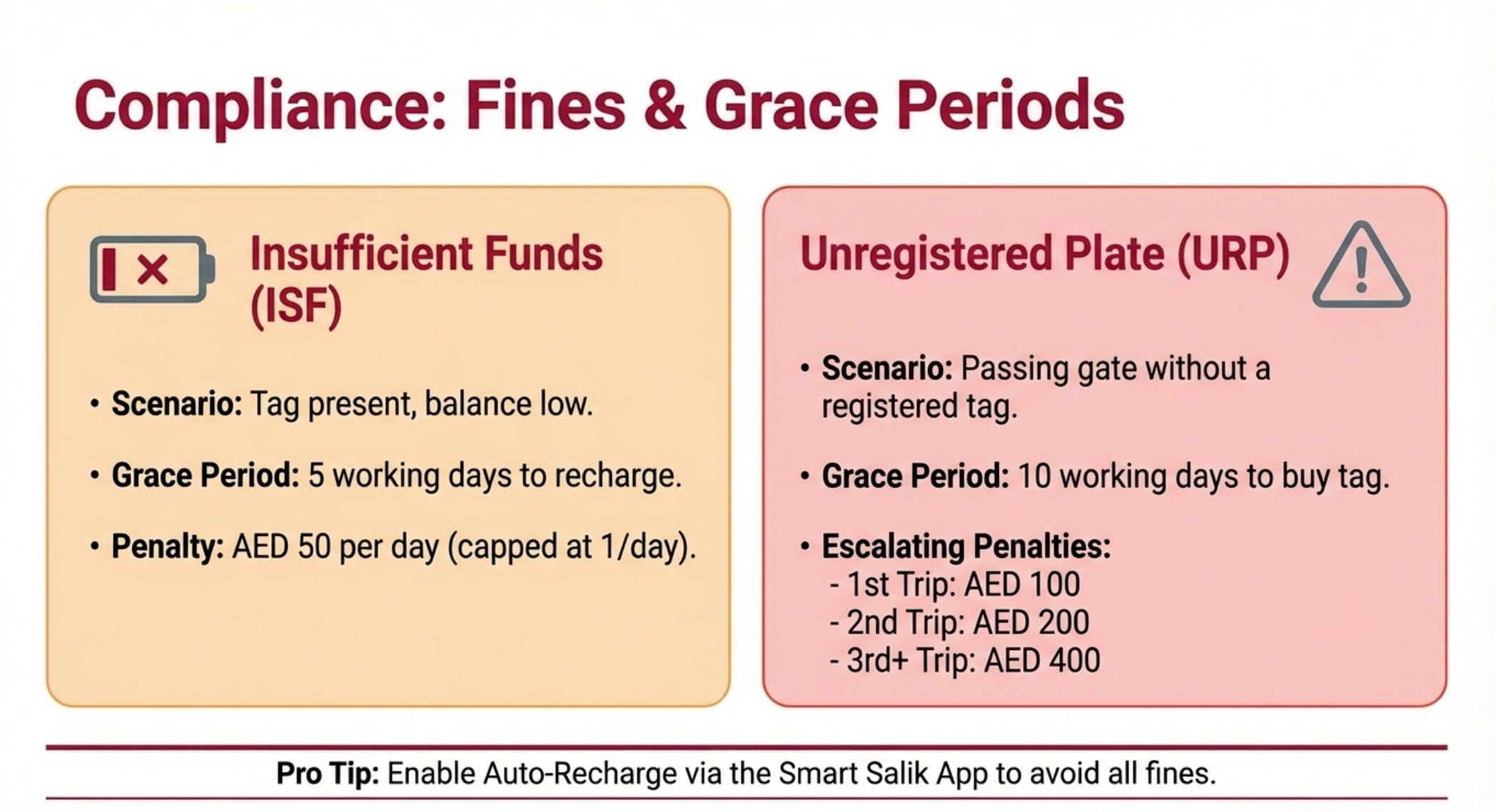
1. Insufficient Funds (ISF) Violation
What It Is: Passing through a Salik gate when your account balance is too low to cover
the toll.
Fine Amount: AED 50 per day
Grace Period: 5 working days to recharge your account after passing with insufficient
funds
How It Works:
1. You pass through gate with AED 2 balance (toll is AED 4 or AED 6)
2. System flags your account as having insufficient funds
3. You receive SMS notification: "Your Salik account has insufficient funds. Please
4. recharge within 5 working days to avoid a fine."
5. If you recharge within 5 working days: NO fine
6. If you don't recharge within 5 working days: AED 50 fine is issued
Important:
- Only one ISF fine per day regardless of how many gates you pass
- Example: You pass 3 gates in one day with zero balance, you get 1 fine (AED
50), not 3 fines
- Grace period is working days (Saturday-Wednesday in UAE; excludes
Thursday-Friday)
- SMS alerts only work if your mobile number is updated in your account
How to Avoid:
- Enable auto-recharge
- Set low balance alerts (AED 25 threshold recommended)
- Check balance weekly via app
- Maintain minimum AED 50 balance at all times
2. Unregistered Plate (URP) Violation
What It Is: Driving through a Salik gate without a registered Salik tag linked to your
vehicle.
Fine Structure (escalates with each violation):
1. First Violation: AED 100
2. Second Violation: AED 200
3. Third Violation and Beyond: AED 400 per violation
Grace Period: 10 working days from your first toll crossing to register and activate
your tag
How It Works:
1. You drive through gate without a tag, or with an inactive tag
2. Cameras photograph your license plate
3. System checks if plate is registered with Salik
4. If not registered: System creates a record
5. You have 10 working days to register
6. If you register within 10 days: NO fine for the first crossing
If you don't register: Fines begin accumulating
Daily Violation Limit: One fine per day, even if you cross multiple gates
Example Scenario:
- Monday: First crossing without tag (no fine yet, 10-day clock starts)
- Tuesday: Second crossing (still no fine, within grace period)
- Following Monday (day 8): Still unregistered (still within grace period)
- Day 11: Still unregistered - first fine issued (AED 100)
- Day 12: Cross another gate - second fine issued (AED 200)
- Day 13: Cross two gates - third fine issued (AED 400, only one fine per day)
How to Avoid:
Purchase and activate tag immediately upon vehicle purchase
If borrowing a car, verify tag is active
Check tag status in app before first drive
If moving to Dubai, register tag within first week
3. Tampering or Damage Violation
What It Is: Attempting to modify, damage, tamper with, or fraudulently use a Salik tag or
toll gate equipment.
Fine Amount: AED 10,000
Additional Consequences: Potential legal action, possible criminal charges for fraud
Examples of Tampering:
Removing tag from one vehicle and using it on another
Altering tag RFID chip
Using a photocopy or fake tag
Damaging toll gate equipment
Covering or obstructing tag to avoid detection
Using a tag registered to a different vehicle
Important: This is treated as a serious offense. The RTA uses sophisticated detection
systems and can identify tampered tags.
How to Avoid: Never attempt to manipulate the system. Always use legitimate, properly
registered tags.
Annual Fine Cap
Maximum Fines Per Vehicle Per Year: AED 10,000
This cap prevents penalties from accumulating excessively. However, reaching this cap
indicates serious non-compliance.
Dispute Process
If you believe a fine was issued in error, you can dispute it:
Time Limit: 13 months from the date the violation was added to your traffic file
How to Dispute:
1. Online (Salik Website):
-Login to salik.ae
- Navigate to "Violations & Disputes"
- Select the violation you wish to dispute
- Provide reason and supporting evidence
- Upload any relevant documents (receipts, proof of tag purchase, etc.)
- Submit dispute
- Receive reference number
2. Smart Salik App:
Open app → Violations
Top on violation → "Dispute"
Enter reason and upload evidence
Submit
3. Phone (800-72545):
Call support
Request to dispute violation
Provide violation details
Explain reason
Follow up via email with supporting documents
4. RTA Customer Happiness Centre:
Visit in person
Bring evidence (tag purchase receipt, account statements, etc.)
Submit written dispute
Receive reference number
Common Dispute Reasons:
Tag was active at time of crossing (prove with account statement)
Vehicle was not driven during violation period (provide evidence)
Technical malfunction of tag (show proof of replacement)
Recently purchased/activated tag (show purchase date vs. violation date)
Resolution Time: Typically 5-10 business days; you'll receive notification via
SMS/email
Outcome:
Accepted: Fine is waived; you receive confirmation
Rejected: Fine stands; you must pay
Note: Disputing does not pause collection. If payment deadline passes during dispute,
you may still need to pay to avoid further penalties.
Checking for Violations
Regularly check to stay aware of any fines:
Method 1: Salik Website
Visit salik.ae → "Violations"
Login or enter plate number
View all pending violations
Method 2: Smart Salik App
Open app → "Violations" tab
View list of fines (if any)
Method 3: RTA Website
Visit rta.ae
Navigate to fines inquiry
Enter plate number
View all traffic fines, including Salik
Method 4: Dubai Police App
Download Dubai Police app
Check traffic fines section
Salik violations appear here
Method 5: Dubai Drive App
Integrated fines viewer
Shows all Salik and traffic violations
Paying Salik Fines
Once a fine is issued, you must pay it:
Payment Methods:
1. Smart Salik App:
- Navigate to Violations
- Select fine
- Pay via credit/debit card
2. Salik Website:
Login → Violations → Pay
Card payment
3. RTA Dubai App:
Salik section → Violations → Pay
4. RTA Customer Happiness Centres:
Visit in person
Pay cash or card at counter
5. Bank Apps:
Some banks allow Salik fine payment
Check your bank's services menu
6. Kiosks:
Salik kiosks (limited locations)
RTA kiosks at malls
Payment Confirmation: Always keep receipt/confirmation SMS as proof of payment
Impact of Unpaid Fines
Consequences of Non-Payment:
1. Vehicle Registration Renewal Blocked: Cannot renew your Mulkiya until all
2. fines are paid
3. Accumulation: Fines continue accumulating (up to annual AED 10,000 cap)
4. Legal Action: Persistent non-payment can lead to legal proceedings
5. License Suspension: In extreme cases, driving license may be suspended
6. Exit Issues: Outstanding fines may prevent you from leaving the UAE
Important: Always settle fines promptly to avoid these complications.
Inactive Accounts and Balance Forfeiture
New Rule (2025): If your Salik account has no activity for 5 years (no tolls, no
payments, no top-ups), the account becomes inactive and the remaining balance is
forfeited.
How to Keep Account Active:
-Use toll gates at least once every 5 years
- Make a balance top-up (even AED 50 counts as activity)
- Do NOT leave unused balances if relocating out of UAE - withdraw or use them
Reactivation: If your account becomes inactive, you must contact Salik support to
reactivate and purchase a new tag.
Notification System
Stay Informed to avoid surprises:
SMS Alerts (ensure mobile number is updated):
- Insufficient funds warning (when balance is low)
- Violation issued
- Fine payment reminder
Email Alerts:
Monthly account statements
Violation notices
Payment confirmations
App Push Notifications:
Real-time low balance warnings
Immediate violation alerts
How to Update Contact Information:
- Login to Salik website or app
- Navigate to Account Settings → Profile
- Update mobile number and email
- Verify new number via OTP
- Save changes
Frequently Asked Questions (FAQs)
General Questions
Q: What does "Salik" mean?
A: Salik means "open" or "clear" in Arabic, reflecting the system's goal of keeping traffic
moving smoothly without physical toll booth barriers.
Q: When was Salik introduced?
A: Salik launched on July 1, 2007, with just two toll gates. It has since expanded to 10
gates.
Q: Who operates Salik?
A: Salik is operated by Salik Company PJSC, in cooperation with Dubai's Roads and
Transport Authority (RTA).
Q: Is Salik mandatory?
A: Yes, if you drive on roads with Salik gates, having an active tag and sufficient
balance is mandatory. There are alternative toll-free routes, but they may add travel
time.
Q: Do I need Salik if I'm only visiting Dubai for a week?
A: If you're renting a car, the rental company provides a vehicle with an active tag. If
you're driving your own vehicle from another emirate and plan to use tolled roads, yes,
you need to purchase and activate a tag.
Tag and Registration
Q: How much does a Salik tag cost?
A: AED 100 (AED 50 for the tag + AED 50 pre-loaded credit) when bought at petrol
stations or RTA centres. AED 120 if purchased online (includes delivery fee).
Q: Can I use one tag for multiple vehicles?
A: No. Each tag is linked to one specific vehicle license plate. You need a separate tag
for each vehicle.
Q: Can I transfer my tag to a new vehicle?
A: No. The tag is permanently affixed to the windshield and cannot be removed. When
you sell your car, the tag stays with it. You must purchase a new tag for your new
vehicle.
Q: What if I damage my tag while cleaning my windshield?
A: If your tag becomes damaged or non-functional, purchase a new tag (AED 100) and
register it. Deactivate the old tag through the app or website.
Q: Do motorcycles need Salik tags?
A: Yes. However, proper placement is challenging since motorcycles don't have
windshields. Contact Salik support (800-72545) for guidance on alternative placement
options.
Charges and Pricing
Q: How much does it cost to pass through a Salik gate?
A: As of 2025: AED 6 during peak hours (6-10 AM, 4-8 PM Mon-Sat), AED 4 during
off-peak hours, and free from 1-6 AM daily. Sundays are flat AED 4 all day.
Q: Is there a daily maximum charge?
A: No. There is no daily cap. Each gate crossing is charged separately.
Q: What are the free hours for Salik?
A: 1:00 AM to 6:00 AM daily, all gates are free. Additionally, Al Maktoum Bridge is free
Monday-Friday 10 PM to 6 AM and all weekend (Saturday 10 PM to Monday 6 AM).
Q: Do I get charged twice if I pass the same gate going and coming back?
A: Yes. Each crossing is charged separately, regardless of direction.
Q: What is the one-hour rule for paired gates?
A: If you pass Al Mamzar North and South (or Al Safa North and South) within one hour
in the same direction, you're only charged once.
Account Management
Q: What's the minimum balance I can have?
A: Technically, there's no enforced minimum, but you should maintain at least AED 50 to
avoid insufficient funds violations.
Q: What's the maximum balance allowed?
A: AED 50,000 per account.
Q: Can I get a refund of my unused Salik balance?
A: No. Salik balances are non-refundable. However, they don't expire for 5 years, so
you can use them whenever needed.
Q: Can I transfer my balance to another person?
A: No. Balances are tied to specific accounts and cannot be transferred.
Q: I'm leaving Dubai permanently. What happens to my balance?
A: Use your balance before leaving by driving through toll gates. Unfortunately, refunds
are not provided, but the balance remains valid for 5 years if you return.
Recharging
Q: What's the minimum recharge amount?
A: AED 50.
Q: Can I recharge in amounts other than multiples of 50?
A: No. Recharges must be in multiples of AED 50 (e.g., 50, 100, 150, 200, etc.).
Q: How long does it take for a recharge to reflect?
A: Instant for most methods (app, website, banking apps). SMS and some ATMs may
take up to 10 minutes.
Q: Can I set up automatic recharges?
A: Yes. Enable auto-recharge in the Smart Salik app. Set a threshold (e.g., AED 20) and
recharge amount (e.g., AED 100), and link a credit card. The system will automatically
top up when your balance is low.
Q: Are there any fees for recharging?
A: No fees for app, website, bank, or ATM recharges. SMS recharges incur a 30 fils
telecom fee.
Violations and Fines
Q: What happens if I drive through a gate without enough balance?
A: You have 5 working days to recharge. If you don't, a AED 50 fine is issued.
Q: I passed through 3 gates in one day with zero balance. Do I get 3 fines?
A: No. Only one fine per day, regardless of how many gates you pass.
Q: I just bought a car and drove through a gate without a tag. Will I be fined
immediately?
A: You have a 10 working day grace period from your first crossing to register a tag. If
you register within 10 days, no fine for the first crossing.
Q: How much is the fine for an unregistered vehicle?
A: First offense: AED 100. Second: AED 200. Third and beyond: AED 400 each.
Q: Can I dispute a Salik fine?
A: Yes. You have 13 months from the violation date to dispute. Use the Salik website,
app, or call 800-72545.
Q: Will unpaid Salik fines affect my vehicle registration renewal?
A: Yes. All fines must be cleared before you can renew your vehicle registration
(Mulkiya).
Special Circumstances
Q: I rent a car. Do I need to get a Salik tag?
A: No. Rental cars come with active tags. The rental company will charge you for toll
usage at the end of your rental period.
Q: My car is registered in Abu Dhabi / Sharjah. Can I use Salik?
A: Yes. Purchase a tag (at RTA centres for non-Dubai plates) and register it. Salik works
for vehicles from all emirates.
Q: Are taxis charged Salik fees?
A: No. Taxis are exempt from Salik charges.
Q: Do electric vehicles get free Salik?
A: Electric vehicles receive free Salik tags (valid for 5 years), but they still pay toll
charges at the standard rates.
Q: What if my tag isn't beeping when I pass through gates?
A: The beep is optional and depends on your tag model. Not all tags beep. As long as
your balance is being deducted (check your account), your tag is working.
Q: I have two vehicles. Can I manage both from one account?
A: Yes. You can add multiple vehicles to a single Salik account, each with its own tag.
Technical Issues
Q: My tag isn't being detected. What should I do?
A: Check placement (should be centered, 5cm below rearview mirror, flat against
windshield). Ensure it's not covered by tint or metal objects. If still not working, purchase
a replacement tag (AED 100).
Q: The app shows a transaction, but I didn't drive through any gate.
A: Verify the date and time. If it's clearly erroneous, contact support (800-72545) with
your account details. This is rare but can happen due to system errors.
Q: I recharged but my balance isn't showing.
A: Wait 10 minutes. If still not reflected, check your email for payment confirmation.
Verify you entered the correct account number. Contact support if issue persists beyond
1 hour.
Q: Can I use Salik if I'm driving a company car?
A: Yes. The tag should be registered under the company's name. Coordinate with your
company's fleet manager or HR department.
Route Planning
Q: How can I avoid Salik gates?
A: Use alternative routes like Al Khail Road, Emirates Road (E611), Sheikh Mohammed
Bin Zayed Road (E311), or local service roads. Use navigation apps with "avoid tolls"
feature. Note: alternate routes may add 10-30 minutes to your journey.
Q: Which route from Sharjah to Dubai has the fewest tolls?
A: Al Ittihad Road is the most direct (1-2 toll gates depending on destination).
Alternatives: Emirates Road or Sheikh Mohammed Bin Zayed Road (no tolls but longer
travel time).
Q: If I work in Dubai but live in Sharjah, how much will Salik cost me monthly?
A: Assuming 5 days/week, 2 crossings/day (to and from work), during peak hours: 10
crossings × AED 6 × 4 weeks = AED 240/month. Off-peak: 10 crossings × AED 4 × 4
weeks = AED 160/month.
Tips for New Dubai Drivers
Moving to Dubai or just started driving here? Here's everything you need to know to
navigate Salik smoothly:
Before You Start Driving
1. Purchase Your Tag Immediately: As soon as you get your vehicle, buy a Salik
tag. Don't wait until after your first crossing.
2. Activate Within 24 Hours: Register and activate your tag the same day you
purchase it. This ensures it's linked to your vehicle before you hit the road.
3. Download the Smart Salik App: Install it on your phone before your first drive.
It's your main tool for monitoring balance and transactions.
4.Load at Least AED 100: Start with a comfortable balance so you don't have to
worry about recharging in your first week.
5. Set Up Auto-Recharge: Enable this feature immediately. It's the single best way
to avoid fines.
Understanding Your Routes
6. Study the Gate Map: Familiarize yourself with where gates are located. Most are
on Sheikh Zayed Road and at creek crossings.
7. Know Your Commute Cost: Calculate how much your daily commute will cost.
8. Example: Dubai Marina to Downtown during peak hours = 2-3 gates = AED
12-18 each way.
Explore Toll-Free Alternatives:
Try Al Khail Road, Emirates Road, or local
roads. They take longer but save money if you're on a budget.
Plan Around Free Hours: If your schedule is flexible, traveling between 1-6 AM
is completely free.
Daily Driving Habits
10. Check Balance Weekly: Make it a Sunday routine. Open the app and verify you
have at least AED 50.
11. Enable Notifications: Turn on SMS and push alerts for low balance warnings.
Don't rely on memory.
12. Keep Payment Method Updated: If your credit card expires, update it
immediately in the app to keep auto-recharge working.
13. Review Transactions Monthly: Check your crossing history to spot any unusual
activity (could indicate tag malfunction or fraud).
Dealing with Special Situations
14. Selling Your Car: Deactivate your Salik account or transfer it to your new
vehicle. The tag stays with the car you're selling.
15. Buying a Used Car: Verify the previous owner deactivated their tag. If not, you
may need to resolve their outstanding fines before registering your own tag.
16. Borrowing a Friend's Car: Confirm their tag is active and has sufficient balance
before driving.
17. Renting a Car: You don't need to do anything. Just know that Salik charges will
appear on your final rental bill.
Cost Management Strategies
18. Track Your Spending: Use the app's monthly reports to see how much you're
spending on tolls. Adjust routes if needed.
19. Carpool: If you commute with colleagues, carpooling splits the Salik cost among
passengers.
20. Consider Off-Peak Travel: If your job allows flexible hours, shifting to off-peak
saves AED 2 per crossing.
21. Combine Errands: Plan your trips to minimize gate crossings. One trip with 2
gates is cheaper than two separate trips with 2 gates each (4 total).
Avoiding Common Mistakes
22. Don't Ignore Low Balance Warnings: That SMS isn't spam. Recharge
immediately to avoid fines.
23. Don't Assume Petrol Stations Always Have Tags: While most do, some
smaller stations run out. Keep a backup plan.
24. Don't Peel Off and Reuse Tags: They're designed to be permanent. Removal
destroys the tag.
25. Don't Share Tags Between Vehicles: Even if you own both cars, each needs its
own tag.
Emergency Scenarios
26. Tag Damaged Mid-Drive: If your tag fails during a journey, buy a new one ASAP
(same day if possible) and register it within 10 days to avoid fines from the
unregistered crossings.
27. Lost Account Login: Use the "Forgot Password" feature on salik.ae or call
800-72545 to reset.
28. Account Hacked/Fraudulent Charges: Contact support immediately
(800-72545) and dispute transactions. Change your password.
For Sharjah-Dubai Commuters
29. Budget AED 200-300/Month: If you commute daily between Sharjah and Dubai,
allocate this amount for tolls.
30. Use Free Hours When Possible: Leaving home by 5:30 AM means free
Mamzar crossing (free window ends at 6 AM).
31. Explore Park and Ride: Consider parking near a metro station in Dubai and
using public transport for the final leg (no tolls).
32. Join Carpool Groups: Search for Sharjah-Dubai carpool groups on social media
to share costs.
Long-Term Success
33. Maintain Good Records: Keep recharge receipts if your company reimburses
Salik. Export monthly statements from the app.
34. Update Contact Info After Moving: If you change addresses or phone
numbers, update your Salik account profile.
35. Educate Family Members: If multiple people drive your car, ensure everyone
knows the tag is active and how to check balance.
36. Leverage Technology: Use navigation apps (Google Maps, Waze) with "avoid
tolls" option when you want to save money or time.
Pro Tips from Long-Time Residents
37. Al Khail Road Is Your Friend: It's the main toll-free artery through Dubai. Learn
it well.
38. Late Night Travel: Running errands after 1 AM? Everything is free. Grocery
shopping at 2 AM saves AED 8-12 round trip.
39. Track Paired Gate Timing: If you're passing Al Safa North, try to hit Al Safa
South within the hour to only pay once.
40. Business Expense: If you're self-employed or run a business, Salik charges are
tax-deductible expenses. Keep monthly statements.
Cultural and Practical Context
41. Respect the System: Salik is a key part of Dubai's infrastructure funding. It
keeps roads world-class.
42. It's Efficient: Unlike toll booths in other countries, Salik doesn't slow traffic.
That's the point.
43. Compare to Other Cities: At AED 4-6 per crossing, it's cheaper than many
global cities (e.g., London's congestion charge, Singapore's ERP).
44. Environmental Benefit: By managing traffic flow, Salik reduces emissions from
idling in congestion.
Resources to Bookmark
45. Salik Website: www.salik.ae (main account portal)
46. RTA Website: www.rta.ae (for broader transport info)
47. Support Hotline: 800-72545 (memorize this number)
48. Smart Salik App: Download on iOS/Android
Final Advice for Newcomers
Be Proactive, Not Reactive: The biggest mistake new drivers make is ignoring Salik
until they get a fine. Set up your tag, enable auto-recharge, and you'll never think about
it again. It becomes as automatic as fueling your car.
Budget Wisely: If you're moving to Dubai, include AED 200-300/month for Salik in your
budget (if you're a frequent driver). It's a real cost of living here.
Stay Informed: Salik updates pricing and policies occasionally (like the 2025 variable
pricing). Check the website yearly for any changes.
Ask for Help: If you're ever confused, the Salik call center (800-72545) is extremely
helpful. Don't hesitate to call.
Now that you understand Salik inside and out, here's an important consideration:
Why Choose LicensePlate.ae?
Instant Valuation: Get a fair, market-based quote for your vehicle in minutes. Our
proprietary algorithm analyzes current market trends, vehicle condition, and demand.
Hassle-Free Process:
1. Enter your vehicle details online
2. Receive an instant valuation
3. Schedule a free inspection at your location
4. Get paid immediately (same day, bank transfer or cash)
5. No Hidden Costs: What we quote is what you get. No surprise deductions for "admin
fees" or "processing charges."
All Paperwork Handled: We take care of RTA transfers, insurance cancellation, and
yes Salik account deactivation coordination. You don't lift a finger.
Fair Market Prices: We buy all makes and models, from economy to luxury. Whether
it's a 2010 Corolla or a 2023 Range Rover, we'll make you a competitive offer.
Special Advantage: Salik-Friendly Service
We understand Salik's nuances:
Outstanding Fines? We'll help clear them as part of the sale process.
Salik Balance Remaining? We'll factor it into your quote or advise on using it
before transfer.
Tag Transfer Questions? Our team knows exactly how to handle Salik during
ownership transfer.
Get Started Today
Three Simple Steps:
1. Get Valuation: Free, instant, no obligation
2. Schedule Inspection: We come to you (home, office, anywhere in Dubai)
3. Get Paid: Cash or bank transfer, same day
Other Services We Offer
Looking for Number Plates? Our sister service specializes in Dubai VIP number
plates. From classic codes to custom combinations, we help you find the perfect plate.
Need Advice? Our experts are available 7 days a week to answer questions about
vehicle sales, RTA processes, Salik, and more.
Conclusion
Salik is an integral part of Dubai's smart city infrastructure. By keeping this
comprehensive guide handy, you'll navigate Dubai's roads with confidence, avoid fines,
and optimize your travel costs.
Remember the Essentials:
- Purchase and activate your tag immediately
- Enable auto-recharge for peace of mind
- Check your balance weekly
- Know your routes and plan accordingly
- Keep contact information updated
- Pay fines promptly if they occur
- Stay Updated: Salik policies evolve. Check www.salik.ae periodically for the latest
updates, especially around pricing changes or new gates.
- Drive Smart: Use free hours when possible, explore toll-free alternatives, and leverage
technology (apps, navigation) to make informed decisions.
- Dubai's roads are among the best in the world, and Salik keeps them that way. With
proper planning and the right tools, toll charges become a minor, manageable part of
your driving experience.
Safe travels!
Delete Comment?
Are you sure you want to delete this comment? This action cannot be undone.
Delete Article?
Are you sure you want to delete this article? This will also delete all comments. This action cannot be undone.